
关于 Redux 的更多
React-Redux
react-redux 是 Redux 提供的 react 绑定,辅助在 react 项目中使用 redux
它的 API 简单,包括一个组件Provider和一个高阶函数connect
Provider
❓ 为什么Provider只传递一个store,被它包裹的组件都能够访问到store的数据呢?
Provider 做了些啥?
- 创建一个
contextValue包含redux传入的store - 通过
context上下文把contextValue传递子组件
Connect
❓connect 做了什么事情讷?
使用容器组件通过context提供的store,并将mapStateToProps和mapDispatchToProps返回的state和dispatch传递给 UI 组件
组件依赖 redux 的state,映射到容器组件的props中,state改变时触发容器组件的props的改变,触发容器组件组件更新视图
const enhancer = connect(mapStateToProps, mapDispatchToProps);
enhancer(Component);
react-redux 丐版实现
Provider
export const Provider = (props) => {
  const { store, children, context } = props;
  const contextValue = { store };
  const Context = context || ReactReduxContext;
  return <Context.Provider value={contextValue}>{children}</Context.Provider>;
};
connect
import { useContext, useReducer } from 'react';
import { ReactReduxContext } from './ReactReduxContext';

export const connect =
  (mapStateToProps, mapDispatchToProps) => (WrappedComponent) => (props) => {
    const { ...wrapperProps } = props;
    const context = useContext(ReactReduxContext);
    const { store } = context; // 解构出 store
    const state = store.getState(); // 拿到 state
    //使用 useReducer 得到一个强制更新函数
    const [, forceComponentUpdateDispatch] = useReducer(
      (count) => count + 1,
      0,
    );
    // 订阅 state 的变化,当 state 变化的时候执行回调
    store.subscribe(() => {
      forceComponentUpdateDispatch();
    });
    // 执行 mapStateToProps 和 mapDispatchToProps
    const stateProps = mapStateToProps?.(state);
    const dispatchProps = mapDispatchToProps?.(store.dispatch);
    // 组装最终的 props
    const actualChildProps = Object.assign(
      {},
      stateProps,
      dispatchProps,
      wrapperProps,
    );
    return <WrappedComponent {...actualChildProps} />;
  };
Redux Middleware
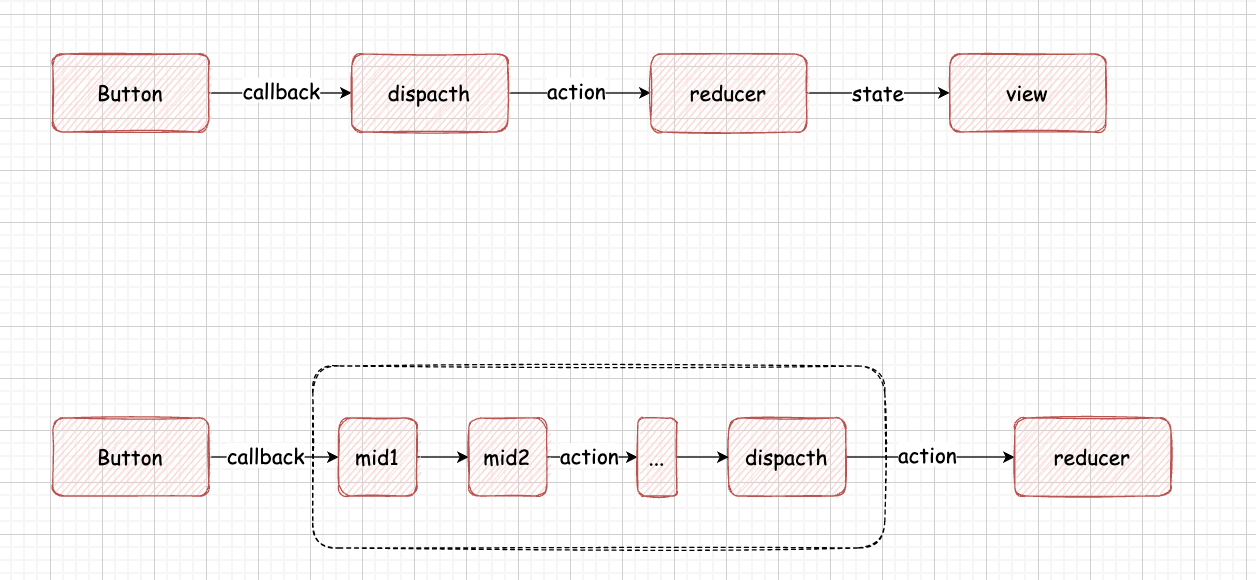
middleware提供分类处理action的机会,在middleware中可以检查每一个action,挑选出特定类型的action做对应操作
打印日志
store.dispatch = (action) => {
  console.log('this state', store.getState());
  console.log(action);
  next(action);
  console.log('next state', store.getState());
};
监控错误
store.dispatch = (action) => {
  try {
    next(action);
  } catch (err) {
    console.log('catch---', err);
  }
};
二者合二为一
store.dispatch = (action) => {
  try {
    console.log('this state', store.getState());
    console.log(action);
    next(action);
    console.log('next state', store.getState());
  } catch (err) {
    console.log('catch---', err);
  }
};
提取 loggerMiddleware/catchMiddleware
const loggerMiddleware = (action) => {
  console.log('this state', store.getState());
  console.log('action', action);
  next(action);
  console.log('next state', store.getState());
};
const catchMiddleware = (action) => {
  try {
    loggerMiddleware(action);
  } catch (err) {
    console.error('错误报告: ', err);
  }
};
store.dispatch = catchMiddleware;
catchMiddleware 中都写死了调用的 loggerMiddleware,loggerMiddleware 中写死了 next(store.dispatch),需要灵活运用,让 middleware 接受 dispatch 参数
const loggerMiddleware = (next) => (action) => {
  console.log('this state', store.getState());
  console.log('action', action);
  next(action);
  console.log('next state', store.getState());
};
const catchMiddleware = (next) => (action) => {
  try {
    /*loggerMiddleware(action);*/
    next(action);
  } catch (err) {
    console.error('错误报告: ', err);
  }
};
/*loggerMiddleware 变成参数传进去*/
store.dispatch = catchMiddleware(loggerMiddleware(next));
middleware 中接受一个 store,就能够把上面的方法提取到单独的函数文件中
export const catchMiddleware = (store) => (next) => (action) => {
  try {
    next(action);
  } catch (err) {
    console.error('错误报告: ', err);
  }
};

export const loggerMiddleware = (store) => (next) => (action) => {
  console.log('this state', store.getState());
  console.log('action', action);
  next(action);
  console.log('next state', store.getState());
};

const logger = loggerMiddleware(store);
const exception = catchMiddleware(store);
store.dispatch = exception(logger(next));
每个 middleware 都需要接受 store 参数,继续优化这个调用函数
export const applyMiddleware =
  (middlewares) => (oldCreateStore) => (reducer, initState) => {
    // 获得老的store
    const store = oldCreateStore(reducer, initState);
    // [catch, logger]
    const chain = middlewares.map((middleware) => middleware(store));
    let oldDispatch = store.dispatch;
    chain
      .reverse()
      .forEach((middleware) => (oldDispatch = middleware(oldDispatch)));
    store.dispatch = oldDispatch;
    return store;
  };

const newStore = applyMiddleware([catchMiddleware, loggerMiddleware])(
  createStore,
)(rootReducer);
Redux 提供了applyMiddleware来加载middleware,applyMiddleware接受三个参数,middlewares数组/redux的createStore/reducer
export default const applyMiddleware = (...middlewares) => createStore => (reducer, ...args) => {
  //由createStore和reducer创建store
    const store = createStore(reducer, ...args)
    let dispatch = store.dispatch
    var middlewareAPI = {
        getState: store.getState,
        dispatch: (action, ...args) => dispatch(action, ...args)
    }
    // 把 getState/dispatch 传给 middleware,
    // map 让每个 middleware 获得了 middlewareAPI 参数
    // 形成一个 chain 匿名函数数组 [f1,f2,f3...fn]
    const chain = middlewares.map(middleware => middleware(middlewareAPI))
    // dispatch = f1(f2(f3(store.dispatch))),把所有的 middleware 串联起来
    dispatch = compose(...chain)(store.dispatch)
    return {
        ...store,
        dispatch
    }
}
applyMiddleware 符合洋葱模型
